> ## Documentation Index
> Fetch the complete documentation index at: https://docs.coval.ai/llms.txt
> Use this file to discover all available pages before exploring further.
# Testing IVR
> Check whether your voice agent routes callers correctly through your phone menu.
IVR testing is one of the simplest things to test thoroughly. An IVR menu is a finite tree — there are only so many ways through it — so you don't have to guess at scenarios or sample. You map out the menu once, and Coval tests **every** path from start to finish.
Use IVR testing when you want to know whether your voice agent walks callers through your phone menu correctly — playing the right prompts, accepting the right keypresses, and landing each caller at the right destination.
You only describe your IVR menu once. Coval turns that menu into a test set that walks every path through it, and an **IVR Flow Adherence** metric scores whether the agent actually followed the tree.
This workflow is for voice simulations — IVR menus are driven by spoken prompts and keypad (DTMF) input.
The whole flow is three steps:
1. [Set up an IVR Flow Adherence metric](#1-set-up-an-ivr-flow-adherence-metric) — describe your menu.
2. [Generate the test set](#2-generate-the-test-set) — one click turns the menu into test cases.
3. [Run the simulation](#3-run-the-simulation) — test the agent and read the results.
## 1. Set up an IVR Flow Adherence metric
Create a new [metric](/concepts/metrics/overview) and choose **IVR Flow Adherence**. The metric holds a description of your phone menu — the **IVR flow** — as a tree of:
* **Nodes** — each one is a prompt the agent is expected to say (e.g. *"Press 1 for billing, 2 for support"*). Mark the end-of-call nodes as **terminal**.
* **Edges** — what the caller does to move from one node to the next: a keypad digit (`1`), a pattern (`\d{4}` for a 4-digit PIN), or a spoken keyword (`operator`). Each edge has a **match type** — `literal`, `regex`, or `fuzzy`.
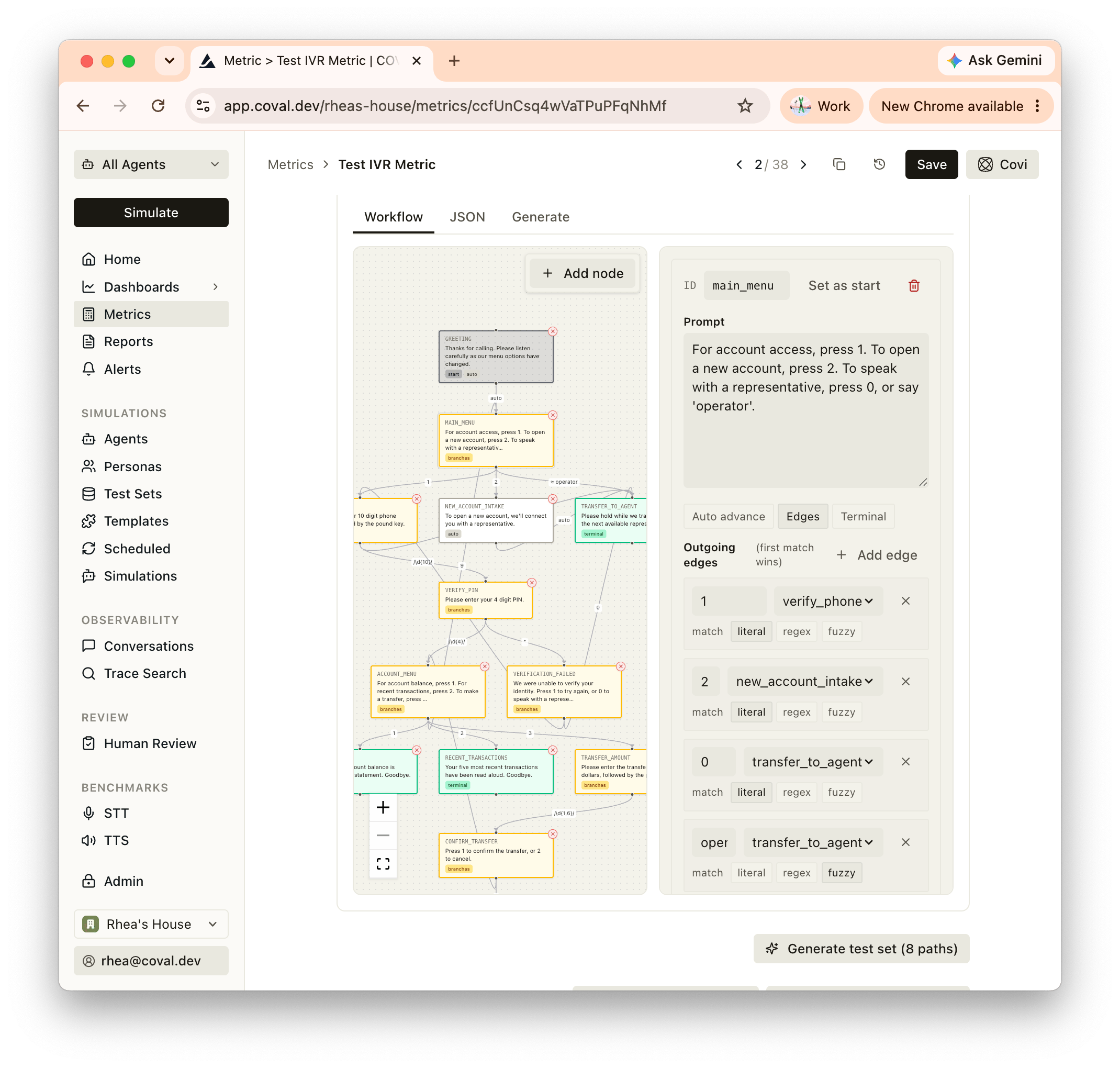 You can build the flow three ways, from the tabs in the flow builder:
* **Workflow** — a visual drag-and-drop editor. Add nodes, set the start node, mark terminal nodes, and draw edges between them.
* **Generate** — describe your IVR in plain language and let Coval draft the tree for you. For example:
> A bank IVR that greets the caller, asks them to press 1 for account access or 2 for a new account, and falls back to an operator if the caller says "operator".
Type **create example tree** to drop in a ready-made sample to learn from.
* **JSON** — paste or edit the flow directly.
```json theme={null}
{
"start_node": "greeting",
"match_threshold": 0.85,
"nodes": [
{ "id": "greeting", "prompt": "Thanks for calling. Press 1 for billing, 2 for support.", "auto_advance_to": "main_menu" },
{ "id": "main_menu", "prompt": "Press 1 for billing, 2 for support." },
{ "id": "billing", "prompt": "You've reached billing.", "terminal": true },
{ "id": "support", "prompt": "You've reached support.", "terminal": true }
],
"edges": [
{ "source": "main_menu", "destination": "billing", "input": "1", "match_type": "literal" },
{ "source": "main_menu", "destination": "support", "input": "2", "match_type": "literal" }
]
}
```
The **Match threshold** (default `0.85`) controls how closely the agent's spoken prompt has to match a node's expected prompt to count as a match — raise it to be stricter about exact wording, lower it to allow more paraphrasing.
Save the metric when your flow is complete.
## 2. Generate the test set
On the metric, click **Generate test set**. The button shows how many paths Coval found — for example, **Generate test set (6 paths)**.
Coval enumerates every route from the start node to each terminal node and creates **one test case per path**. Each is a [Script](/concepts/test-sets/input-types) test case that replays the caller's inputs along that path:
* Keypad inputs become **DTMF** turns (`1`, `2`, a generated PIN for a `\d{4}` edge).
* Spoken keywords (fuzzy edges like `operator`) stay as **text** turns.
* The exact nodes the path should visit are saved as the test case's expected output, so the metric knows the correct route.
**DTMF or speech.** You control whether the generated caller inputs are *dialed* or *spoken* through how you define each edge: keypad digits (`1`, `*`, `#`) generate DTMF turns the caller presses, while keyword edges generate spoken text. Use digit edges to test keypad navigation, keyword edges to test voice navigation, or mix both.
Coval saves these as a test set named `IVR Test Set – ` and opens it. Review the generated cases and tweak any wording before you run.
## 3. Run the simulation
Launch a [run](/concepts/runs/overview) with:
* your **voice agent**
* the generated **IVR test set**
* the **IVR Flow Adherence** metric
* a voice [persona](/concepts/personas/overview) — the script controls the keypresses and replies, so any neutral voice works
Launch the run. Coval calls your agent, replays each path's inputs, and scores the result against the flow.
## Read the results
Open a simulation and look at the **IVR Flow Adherence** metric. The score is the fraction of the nodes the caller walked whose prompt matched the flow — so `1.0` (100%) means every expected prompt was matched and every keypress routed as designed.
**Adherence is pass/fail, not a grade.** Only a perfect `1.0` counts as a pass (green) — any divergence, even a single mismatched prompt or a keypress that routed to the wrong place, fails (red). Treat anything below 100% as a failure to investigate, not a partial success. The deep-dive view adds descriptive bands for context — *Perfect adherence* (100%), *Mostly adhered* (75%+), *Partial adherence* (above 0%), and *Did not adhere* (0%) — but those are just severity coloring, not passing scores.
The **Walk** shows you what happened step by step: each node as **Passed** / **Failed** / **Not visited**, the **first divergence** (expected vs. actual prompt side by side), and each keypress with the branch it matched and where it led. Use it to decide where the fix belongs:
* **Prompt wording** — the agent said roughly the right thing but scored below the match threshold. Tighten the agent's prompt, or adjust the threshold if your wording is intentionally flexible.
* **Routing** — a keypress led somewhere unexpected. Fix the agent's menu handling or DTMF routing.
* **Coverage** — add nodes or edges to the flow and regenerate the test set to exercise more of the menu.
You can build the flow three ways, from the tabs in the flow builder:
* **Workflow** — a visual drag-and-drop editor. Add nodes, set the start node, mark terminal nodes, and draw edges between them.
* **Generate** — describe your IVR in plain language and let Coval draft the tree for you. For example:
> A bank IVR that greets the caller, asks them to press 1 for account access or 2 for a new account, and falls back to an operator if the caller says "operator".
Type **create example tree** to drop in a ready-made sample to learn from.
* **JSON** — paste or edit the flow directly.
```json theme={null}
{
"start_node": "greeting",
"match_threshold": 0.85,
"nodes": [
{ "id": "greeting", "prompt": "Thanks for calling. Press 1 for billing, 2 for support.", "auto_advance_to": "main_menu" },
{ "id": "main_menu", "prompt": "Press 1 for billing, 2 for support." },
{ "id": "billing", "prompt": "You've reached billing.", "terminal": true },
{ "id": "support", "prompt": "You've reached support.", "terminal": true }
],
"edges": [
{ "source": "main_menu", "destination": "billing", "input": "1", "match_type": "literal" },
{ "source": "main_menu", "destination": "support", "input": "2", "match_type": "literal" }
]
}
```
The **Match threshold** (default `0.85`) controls how closely the agent's spoken prompt has to match a node's expected prompt to count as a match — raise it to be stricter about exact wording, lower it to allow more paraphrasing.
Save the metric when your flow is complete.
## 2. Generate the test set
On the metric, click **Generate test set**. The button shows how many paths Coval found — for example, **Generate test set (6 paths)**.
Coval enumerates every route from the start node to each terminal node and creates **one test case per path**. Each is a [Script](/concepts/test-sets/input-types) test case that replays the caller's inputs along that path:
* Keypad inputs become **DTMF** turns (`1`, `2`, a generated PIN for a `\d{4}` edge).
* Spoken keywords (fuzzy edges like `operator`) stay as **text** turns.
* The exact nodes the path should visit are saved as the test case's expected output, so the metric knows the correct route.
**DTMF or speech.** You control whether the generated caller inputs are *dialed* or *spoken* through how you define each edge: keypad digits (`1`, `*`, `#`) generate DTMF turns the caller presses, while keyword edges generate spoken text. Use digit edges to test keypad navigation, keyword edges to test voice navigation, or mix both.
Coval saves these as a test set named `IVR Test Set – ` and opens it. Review the generated cases and tweak any wording before you run.
## 3. Run the simulation
Launch a [run](/concepts/runs/overview) with:
* your **voice agent**
* the generated **IVR test set**
* the **IVR Flow Adherence** metric
* a voice [persona](/concepts/personas/overview) — the script controls the keypresses and replies, so any neutral voice works
Launch the run. Coval calls your agent, replays each path's inputs, and scores the result against the flow.
## Read the results
Open a simulation and look at the **IVR Flow Adherence** metric. The score is the fraction of the nodes the caller walked whose prompt matched the flow — so `1.0` (100%) means every expected prompt was matched and every keypress routed as designed.
**Adherence is pass/fail, not a grade.** Only a perfect `1.0` counts as a pass (green) — any divergence, even a single mismatched prompt or a keypress that routed to the wrong place, fails (red). Treat anything below 100% as a failure to investigate, not a partial success. The deep-dive view adds descriptive bands for context — *Perfect adherence* (100%), *Mostly adhered* (75%+), *Partial adherence* (above 0%), and *Did not adhere* (0%) — but those are just severity coloring, not passing scores.
The **Walk** shows you what happened step by step: each node as **Passed** / **Failed** / **Not visited**, the **first divergence** (expected vs. actual prompt side by side), and each keypress with the branch it matched and where it led. Use it to decide where the fix belongs:
* **Prompt wording** — the agent said roughly the right thing but scored below the match threshold. Tighten the agent's prompt, or adjust the threshold if your wording is intentionally flexible.
* **Routing** — a keypress led somewhere unexpected. Fix the agent's menu handling or DTMF routing.
* **Coverage** — add nodes or edges to the flow and regenerate the test set to exercise more of the menu.