> ## Documentation Index
> Fetch the complete documentation index at: https://docs.coval.ai/llms.txt
> Use this file to discover all available pages before exploring further.
# MCP Server
> Use Coval directly from Claude Desktop, Cursor, and other MCP-compatible clients
The **Coval MCP Server** enables AI assistants to interact with Coval's evaluation APIs through the [Model Context Protocol](https://modelcontextprotocol.io).
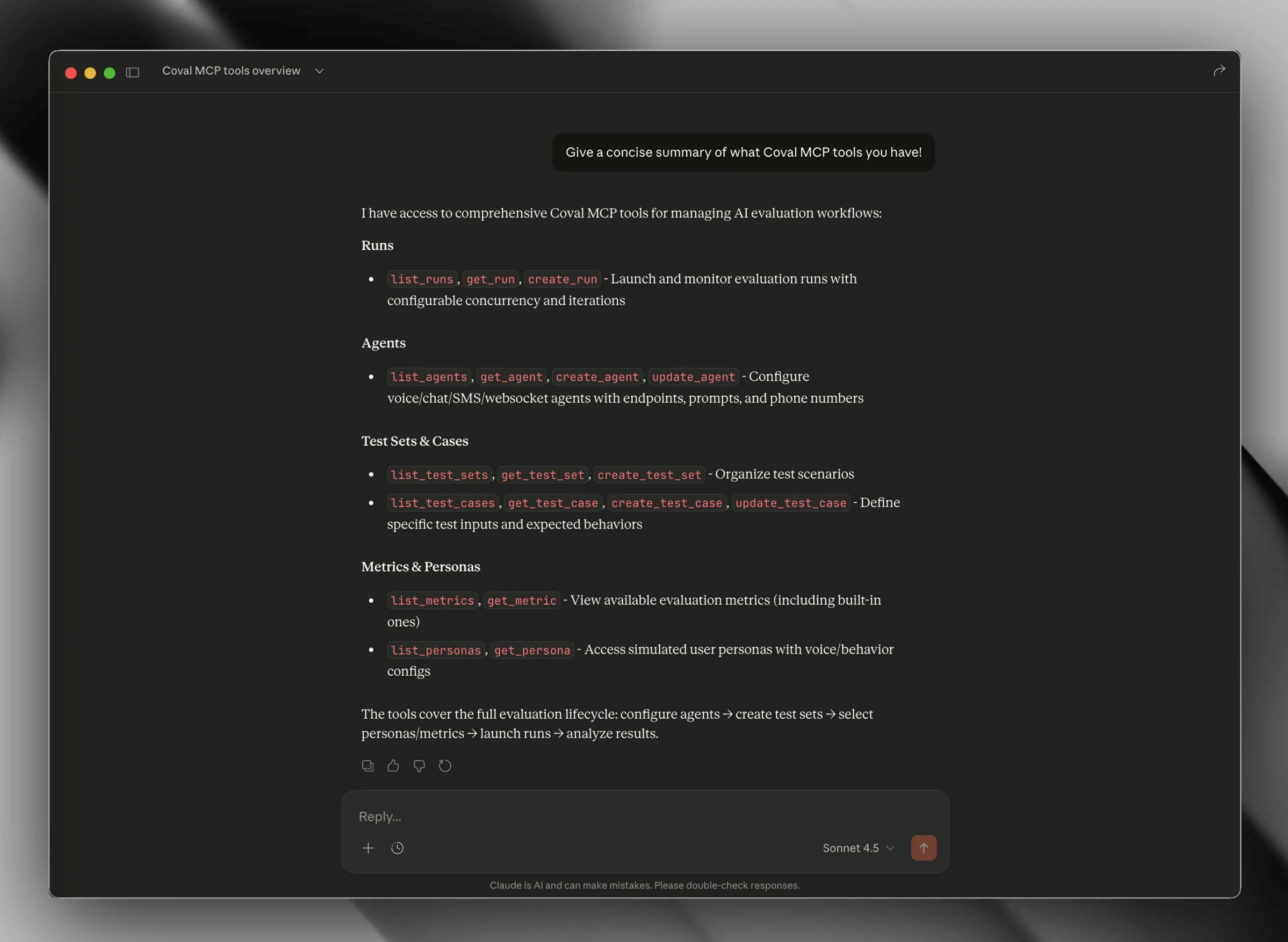 ## What You Can Do
With the MCP server, you can ask Claude or Cursor to:
* **Launch evaluations** - "Run the billing test set against my support agent"
* **Monitor runs** - "What's the status of my latest evaluation?"
* **Manage agents** - "Create a new voice agent for customer service"
* **View metrics** - "Show me the metrics for run abc123"
* **Organize tests** - "List my test sets and their configurations"
## Quick Start
Go to [Coval Dashboard](https://app.coval.dev/settings) and copy your API key.
Add the Coval MCP server to your client's config file:
Connects to Coval's managed MCP endpoint. No local server to maintain.
```json theme={null}
{
"mcpServers": {
"coval": {
"command": "npx",
"args": [
"-y",
"mcp-remote",
"https://mcp.coval.dev/mcp",
"--header",
"X-API-Key: ${COVAL_API_KEY}"
],
"env": {
"COVAL_API_KEY": "your_api_key_here"
}
}
}
}
```
Runs the MCP server locally on your machine. Useful for custom API endpoints or development.
```json theme={null}
{
"mcpServers": {
"coval": {
"command": "npx",
"args": ["-y", "@covalai/mcp-server"],
"env": {
"COVAL_API_KEY": "your_api_key_here"
}
}
}
}
```
See [Installation](/mcp/installation) for config file locations per client and platform.
Fully quit and reopen your MCP client to load the server.
Ask Claude: "List my Coval agents" or "Show my recent evaluation runs"
## Available Tools
The MCP server exposes 18 tools across 6 categories:
| Category | Tools | Description |
| -------------- | -------------------------------------------------------------------------- | ------------------------------ |
| **Runs** | `list_runs`, `get_run`, `create_run`, `delete_run` | Launch and monitor evaluations |
| **Agents** | `list_agents`, `get_agent`, `create_agent`, `update_agent` | Manage agent configurations |
| **Test Sets** | `list_test_sets`, `get_test_set`, `create_test_set` | Organize test cases |
| **Test Cases** | `list_test_cases`, `get_test_case`, `create_test_case`, `update_test_case` | Manage individual test cases |
| **Metrics** | `list_metrics`, `get_metric` | View evaluation metrics |
| **Personas** | `list_personas`, `get_persona` | Configure simulated users |
See complete parameter documentation for all tools
## Example Usage
Once connected, you can ask Claude or Cursor things like:
* "Show me my recent evaluation runs"
* "List all my agents"
* "Run an evaluation of my customer-support-agent against the billing-inquiries test set"
* "What are the metrics for run abc123?"
* "Create a new test set for voice agent scenarios"
## Requirements
* Node.js 20+
* Coval API key
* MCP-compatible client (Claude Desktop, Cursor, etc.)
## Support
* [GitHub Issues](https://github.com/coval-ai/mcp-server/issues)
* [Coval Support](mailto:support@coval.dev)
## What You Can Do
With the MCP server, you can ask Claude or Cursor to:
* **Launch evaluations** - "Run the billing test set against my support agent"
* **Monitor runs** - "What's the status of my latest evaluation?"
* **Manage agents** - "Create a new voice agent for customer service"
* **View metrics** - "Show me the metrics for run abc123"
* **Organize tests** - "List my test sets and their configurations"
## Quick Start
Go to [Coval Dashboard](https://app.coval.dev/settings) and copy your API key.
Add the Coval MCP server to your client's config file:
Connects to Coval's managed MCP endpoint. No local server to maintain.
```json theme={null}
{
"mcpServers": {
"coval": {
"command": "npx",
"args": [
"-y",
"mcp-remote",
"https://mcp.coval.dev/mcp",
"--header",
"X-API-Key: ${COVAL_API_KEY}"
],
"env": {
"COVAL_API_KEY": "your_api_key_here"
}
}
}
}
```
Runs the MCP server locally on your machine. Useful for custom API endpoints or development.
```json theme={null}
{
"mcpServers": {
"coval": {
"command": "npx",
"args": ["-y", "@covalai/mcp-server"],
"env": {
"COVAL_API_KEY": "your_api_key_here"
}
}
}
}
```
See [Installation](/mcp/installation) for config file locations per client and platform.
Fully quit and reopen your MCP client to load the server.
Ask Claude: "List my Coval agents" or "Show my recent evaluation runs"
## Available Tools
The MCP server exposes 18 tools across 6 categories:
| Category | Tools | Description |
| -------------- | -------------------------------------------------------------------------- | ------------------------------ |
| **Runs** | `list_runs`, `get_run`, `create_run`, `delete_run` | Launch and monitor evaluations |
| **Agents** | `list_agents`, `get_agent`, `create_agent`, `update_agent` | Manage agent configurations |
| **Test Sets** | `list_test_sets`, `get_test_set`, `create_test_set` | Organize test cases |
| **Test Cases** | `list_test_cases`, `get_test_case`, `create_test_case`, `update_test_case` | Manage individual test cases |
| **Metrics** | `list_metrics`, `get_metric` | View evaluation metrics |
| **Personas** | `list_personas`, `get_persona` | Configure simulated users |
See complete parameter documentation for all tools
## Example Usage
Once connected, you can ask Claude or Cursor things like:
* "Show me my recent evaluation runs"
* "List all my agents"
* "Run an evaluation of my customer-support-agent against the billing-inquiries test set"
* "What are the metrics for run abc123?"
* "Create a new test set for voice agent scenarios"
## Requirements
* Node.js 20+
* Coval API key
* MCP-compatible client (Claude Desktop, Cursor, etc.)
## Support
* [GitHub Issues](https://github.com/coval-ai/mcp-server/issues)
* [Coval Support](mailto:support@coval.dev)