> ## Documentation Index
> Fetch the complete documentation index at: https://docs.coval.ai/llms.txt
> Use this file to discover all available pages before exploring further.
# Sofia in Slack (Beta)
> Connect Slack, bind one channel to a Coval workspace, and test Sofia's daily brief during the limited beta.
**Limited beta.** Sofia in Slack is available only to organizations that
Coval has added to the beta. Ask your Coval contact to confirm access before
you start. Features, permissions, and setup steps may change during the beta.
Sofia can post a daily summary of scheduled-investigation findings to a Slack
channel that your organization chooses. The brief contains evaluation summaries
and links back to Coval. It does not include transcript excerpts.
For the initial beta, use one dedicated internal channel and enable **Daily
brief** only. Leave **Conversations** off unless your Coval contact explicitly
confirms that it is included in your beta.
## Before you start
You need:
* An organization admin account in Coval.
* Permission to install or approve apps in your Slack workspace. Your Slack
administrator may need to approve the Coval app.
* A Coval workspace with scheduled-investigation coverage.
* A dedicated Slack channel for the beta. Start with a channel that does not
include guests and is not shared through Slack Connect.
Coval must enable your organization before the Sofia channel controls appear.
If **Sofia channel bindings** is missing, or you see **Sofia in Slack is not
available yet**, ask your Coval contact to confirm your beta access.
## Connect Slack
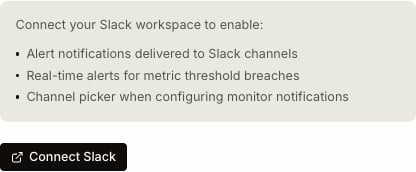
In Coval, open **Settings > Integrations > Slack**.
Select **Connect Slack**. In Slack, choose the intended workspace, review
the requested permissions, and approve the installation.
Slack lists the app as **Coval**. This is the app that delivers Sofia's
daily briefs.
 After Slack redirects you back, confirm that Coval shows the correct
connected workspace. If Coval asks you to reconnect, follow the on-screen
reconnect flow before adding a channel.
## Bind a channel for the daily brief
Under **Sofia channel bindings**, select **Add channel**, then configure the
binding:
1. Choose the Slack channel.
2. Choose the Coval workspace whose investigation findings should appear.
3. Turn **Conversations** off for the initial beta.
4. Enable **Daily brief**.
5. Choose the delivery hour and enter an [IANA timezone](https://en.wikipedia.org/wiki/List_of_tz_database_time_zones), such as `America/Los_Angeles`.
6. Read and accept the channel-audience acknowledgement.
7. Select **Save binding**.
Choose the channel before adjusting its settings. If you change the selected
channel, review the settings again before saving; Coval loads that channel's
saved settings or defaults.
After Slack redirects you back, confirm that Coval shows the correct
connected workspace. If Coval asks you to reconnect, follow the on-screen
reconnect flow before adding a channel.
## Bind a channel for the daily brief
Under **Sofia channel bindings**, select **Add channel**, then configure the
binding:
1. Choose the Slack channel.
2. Choose the Coval workspace whose investigation findings should appear.
3. Turn **Conversations** off for the initial beta.
4. Enable **Daily brief**.
5. Choose the delivery hour and enter an [IANA timezone](https://en.wikipedia.org/wiki/List_of_tz_database_time_zones), such as `America/Los_Angeles`.
6. Read and accept the channel-audience acknowledgement.
7. Select **Save binding**.
Choose the channel before adjusting its settings. If you change the selected
channel, review the settings again before saving; Coval loads that channel's
saved settings or defaults.
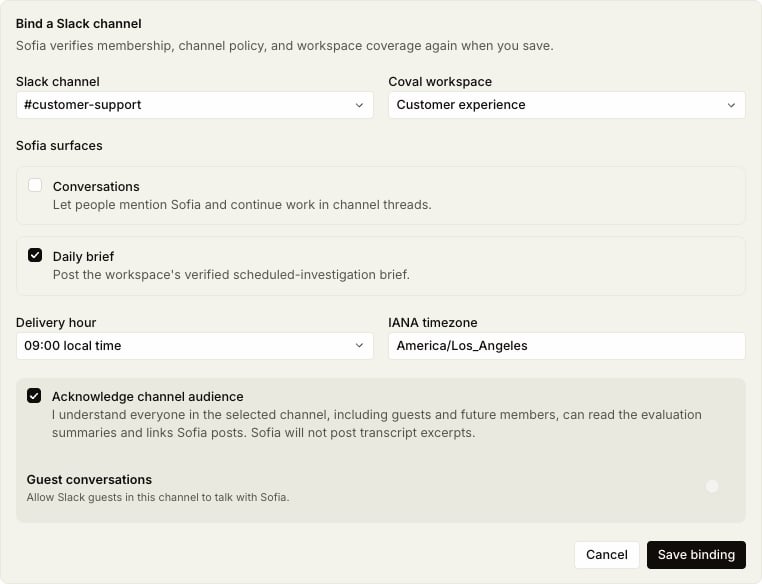 Everyone who can read the channel, including future members, can read Sofia's
summaries and follow their links. Choose a channel whose audience is appropriate
for the Coval workspace's evaluation results.
### Private channels
Slack does not reveal a private channel to an app until the app has joined it.
In the private channel, run:
```text theme={null}
/invite @Coval
```
Select the **Coval** app in Slack's invite picker. Then return to Coval and
select **Refresh Slack channels**. Sofia can join a public channel when you
save, but it must already be a member of a private channel.
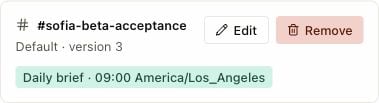
When the binding is saved, Coval shows the channel, workspace, delivery time,
and timezone together. Confirm that all four match your intended setup.
Everyone who can read the channel, including future members, can read Sofia's
summaries and follow their links. Choose a channel whose audience is appropriate
for the Coval workspace's evaluation results.
### Private channels
Slack does not reveal a private channel to an app until the app has joined it.
In the private channel, run:
```text theme={null}
/invite @Coval
```
Select the **Coval** app in Slack's invite picker. Then return to Coval and
select **Refresh Slack channels**. Sofia can join a public channel when you
save, but it must already be a member of a private channel.
When the binding is saved, Coval shows the channel, workspace, delivery time,
and timezone together. Confirm that all four match your intended setup.
 ## Run the first beta test
Use this small test before adding more channels or people:
1. Choose the next full delivery hour, leaving enough time to finish setup
before that hour begins.
2. Confirm the saved binding shows the intended channel, Coval workspace,
delivery hour, and timezone.
3. Wait for the first scheduled brief. It normally arrives shortly after the
selected hour.
4. Confirm that exactly one message appears in the bound channel.
5. Check that the workspace name, date range, finding summaries, and Coval links
are correct.
6. Open at least one link and confirm it stays in the intended Coval
organization and workspace.
7. Confirm that the message contains no transcript excerpts or information that
should not be visible to everyone in the channel.
8. Keep the binding unchanged for the next hour and confirm that no duplicate
brief appears.
## Troubleshooting
| What you see | What to do |
| - | - |
| **Sofia channel bindings** is missing, or **Sofia in Slack is not available yet** appears | Ask your Coval contact to confirm that your organization is in the beta. |
| Only an organization admin can manage bindings | Ask a Coval organization admin to complete setup. |
| The Slack workspace needs approval | Ask a Slack workspace administrator to approve the Coval app. |
| A private channel is missing | Run `/invite @Coval` in that channel and select the **Coval** app, then select **Refresh Slack channels** in Coval. |
| Daily brief is unavailable | Ask your Coval contact to confirm scheduled-investigation coverage for the selected Coval workspace. |
| No brief arrived | Confirm the saved channel, workspace, hour, and timezone. Wait at least 10 minutes after the selected hour, then send the test details above to your Coval contact. |
| More than one brief arrived | Do not remove and recreate the binding. Preserve the messages and send their Slack links and timestamps to your Coval contact. |
## Beta boundaries
* Start with one Coval workspace and one dedicated internal Slack channel.
* Do not use a Slack Connect channel for the initial test.
* Leave **Conversations** and guest conversations off unless Coval explicitly
enables them for your beta.
* Treat Slack as a summary surface. Review linked evidence in Coval before
making a high-impact decision.
* Remove the binding or disconnect Slack from **Settings > Integrations >
Slack** if you need to stop future Sofia messages.
This documentation is built and hosted on [Mintlify](https://mintlify.com), a developer documentation platform.
## Run the first beta test
Use this small test before adding more channels or people:
1. Choose the next full delivery hour, leaving enough time to finish setup
before that hour begins.
2. Confirm the saved binding shows the intended channel, Coval workspace,
delivery hour, and timezone.
3. Wait for the first scheduled brief. It normally arrives shortly after the
selected hour.
4. Confirm that exactly one message appears in the bound channel.
5. Check that the workspace name, date range, finding summaries, and Coval links
are correct.
6. Open at least one link and confirm it stays in the intended Coval
organization and workspace.
7. Confirm that the message contains no transcript excerpts or information that
should not be visible to everyone in the channel.
8. Keep the binding unchanged for the next hour and confirm that no duplicate
brief appears.
## Troubleshooting
| What you see | What to do |
| - | - |
| **Sofia channel bindings** is missing, or **Sofia in Slack is not available yet** appears | Ask your Coval contact to confirm that your organization is in the beta. |
| Only an organization admin can manage bindings | Ask a Coval organization admin to complete setup. |
| The Slack workspace needs approval | Ask a Slack workspace administrator to approve the Coval app. |
| A private channel is missing | Run `/invite @Coval` in that channel and select the **Coval** app, then select **Refresh Slack channels** in Coval. |
| Daily brief is unavailable | Ask your Coval contact to confirm scheduled-investigation coverage for the selected Coval workspace. |
| No brief arrived | Confirm the saved channel, workspace, hour, and timezone. Wait at least 10 minutes after the selected hour, then send the test details above to your Coval contact. |
| More than one brief arrived | Do not remove and recreate the binding. Preserve the messages and send their Slack links and timestamps to your Coval contact. |
## Beta boundaries
* Start with one Coval workspace and one dedicated internal Slack channel.
* Do not use a Slack Connect channel for the initial test.
* Leave **Conversations** and guest conversations off unless Coval explicitly
enables them for your beta.
* Treat Slack as a summary surface. Review linked evidence in Coval before
making a high-impact decision.
* Remove the binding or disconnect Slack from **Settings > Integrations >
Slack** if you need to stop future Sofia messages.
This documentation is built and hosted on [Mintlify](https://mintlify.com), a developer documentation platform.